Apache Kafka
Kafka is a distributed, partitioned, replicated commit log service.It is also a high volume message oriented middleware.
Kafka maintains feeds of messages in categories called topics. Processes that publish messages to a Kafka topic are called producers. Processes that subscribe to topics and process the feed of published messages are called consumers.
At a very basic level, a produce gives a text message(or binary) to Kafka server and it sends it to the consumer.
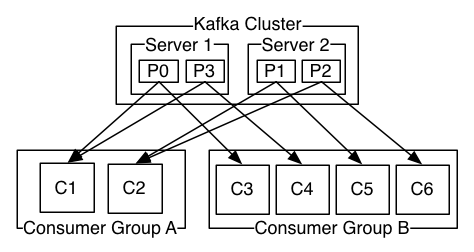
Traditional messaging middleaware has two delivery models: queue and publish-subscribe. In a queue, a pool of consumers may read from a server and each message goes to one of them; in publish-subscribe the message is broadcast to all consumers. However, Kafka offers a single consumer abstraction that generalizes both of these—the consumer group. All the instances in a consumer group, perform the same logical operation to the messages they receive, giving high scalability. Each message published to a topic is delivered to one consumer instance within each subscribing consumer group.
If all the consumer instances have the same consumer group, then this works just like a traditional queue balancing load over the consumers.
If all the consumer instances have different consumer groups, then this works like publish-subscribe and all messages are broadcast to all consumers.
With that let's get to it.
Install/Start Kafka
Download the tar-zip and un-tar it.
> tar -xzf kafka_2.10-0.8.2.0.tgz
> cd kafka_2.10-0.8.2.0
Start a ZooKeeper server (Kafka uses the zookeeper server). I used the convenience script that came with kafka to get a quick single-node ZooKeeper instance.
> bin/zookeeper-server-start.sh config/zookeeper.properties
[2015-04-22 15:01:37,495] INFO Reading configuration from: config/zookeeper.properties (org.apache.zookeeper.server.quorum.QuorumPeerConfig)
...
Now start the Kafka server
> bin/kafka-server-start.sh config/server.properties
[2015-04-22 15:01:47,028] INFO Verifying properties (kafka.utils.VerifiableProperties)
[2015-04-22 15:01:47,051] INFO Property socket.send.buffer.bytes is overridden to 1048576 (kafka.utils.VerifiableProperties)
...
Create a Topic
I created a topic named "test" with a single partition and only one replica:
> bin/kafka-topics.sh --create --zookeeper localhost:2181 --replication-factor 1 --partitions 1 --topic testWe can now see that topic if we run the list topic command:
> bin/kafka-topics.sh --list --zookeeper localhost:2181
test
Alternatively, instead of manually creating topics you can also configure your brokers to auto-create topics when a non-existent topic is published to.
Send Messages
Kafka comes with a command line client that can take input and send it out as messages to the Kafka cluster. By default each line will be sent as a separate message.
We can see that by running the producer and then type a few messages into the console to send to the server.
> bin/kafka-console-producer.sh --broker-list localhost:9092 --topic test
This is a message
This is another message
Start a consumer
Kafka also has a command line consumer that will dump out messages to standard output.
> bin/kafka-console-consumer.sh --zookeeper localhost:2181 --topic test --from-beginning
This is a message
This is another message
Setting up a multi-broker cluster
To get a feel for multi-broker cluster, we expand our cluster to three nodes on our local machine.
First we make a config file for each of the brokers:
> cp config/server.properties config/server-1.properties
> cp config/server.properties config/server-2.properties
We then edit these new files in he editor and set the following properties:
config/server-1.properties:
    broker.id=1
    port=9093
    log.dir=/tmp/kafka-logs-1

config/server-2.properties:
    broker.id=2
    port=9094
    log.dir=/tmp/kafka-logs-2
The broker-id property is unique. We give unique port and log directory because we are running them on same machine.
We already have Zookeeper and our single node started, so we just need to start the two new nodes:
> bin/kafka-server-start.sh config/server-1.properties &
...
> bin/kafka-server-start.sh config/server-2.properties &
...
Then, we create a new topic with a replication factor of three:
> bin/kafka-topics.sh --create --zookeeper localhost:2181 --replication-factor 3 --partitions 1 --topic my-replicated-topicWe can run the "describe topics" command to see which broker is doing what:
> bin/kafka-topics.sh --describe --zookeeper localhost:2181 --topic my-replicated-topic
Topic:my-replicated-topic    PartitionCount:1    ReplicationFactor:3 Configs:
    Topic: my-replicated-topic  Partition: 0    Leader: 1   Replicas: 1,2,0 Isr: 1,2,0
The first line gives a summary of all the partitions, each additional line gives information about one partition. Since we have only one partition for this topic there is only one line.
leader is the node responsible for all reads and writes for the given partition.
replicas is the list of nodes that replicate the log for this partition.
isr is the set of "in-sync" replicas. This is the subset of the replicas list that is currently alive and caught-up to the leader.
In this example node 1 is the leader for the only partition of the topic.
We can run the same command on the original topic we created to see where it is:
> bin/kafka-topics.sh --describe --zookeeper localhost:2181 --topic test
Topic:test    PartitionCount:1    ReplicationFactor:1 Configs:
    Topic: test Partition: 0    Leader: 0   Replicas: 0 Isr: 0
If topic has no replicas and is on server 0, the only server in our cluster when we created it.
Let's publish a few messages to our new topic:
> bin/kafka-console-producer.sh --broker-list localhost:9092 --topic my-replicated-topic
...
my test message 1
my test message 2
^C
Now let's consume these messages:
> bin/kafka-console-consumer.sh --zookeeper localhost:2181 --from-beginning --topic my-replicated-topic
...
my test message 1
my test message 2
^C
Now let's test out fault-tolerance. Broker 1 was acting as the leader so we kill it:
> ps | grep server-1.properties
7564 ttys002    0:15.91 /System/Library/Frameworks/JavaVM.framework/Versions/1.6/Home/bin/java...
> kill -9 7564> bin/kafka-topics.sh --describe --zookeeper localhost:2181 --topic my-replicated-topic
Topic:my-replicated-topic PartitionCount:1 ReplicationFactor:3 Configs:
Topic: my-replicated-topic Partition: 0 Leader: 2 Replicas: 1,2,0 Isr: 2,0The messages are still be available for consumption throught the new leader as the original leader is down:
> bin/kafka-console-consumer.sh --zookeeper localhost:2181 --from-beginning --topic my-replicated-topic
...
my test message 1
my test message 2
^C
Ruby Client for Kafka - Poseidon
Posiedon is kafka client.
Consuming and Producing implementations using Posiedon:
Sending messages to Kafka
require 'poseidon'

producer = Poseidon::Producer.new(["localhost:9092"], "my\_test\_producer")

messages = []
messages
Fetching messages from Kafka
require 'poseidon'

consumer = Poseidon::PartitionConsumer.new("my_test_consumer", "localhost", 9092, "topic1", 0, :earliest_offset)

loop do
  messages = consumer.fetch
  messages.each do |m|
    puts m.value
  end
end
References: http://kafka.apache.org/documentation.html#introduction